Context-Aware AI: Your CRM Says Chase. Should You?
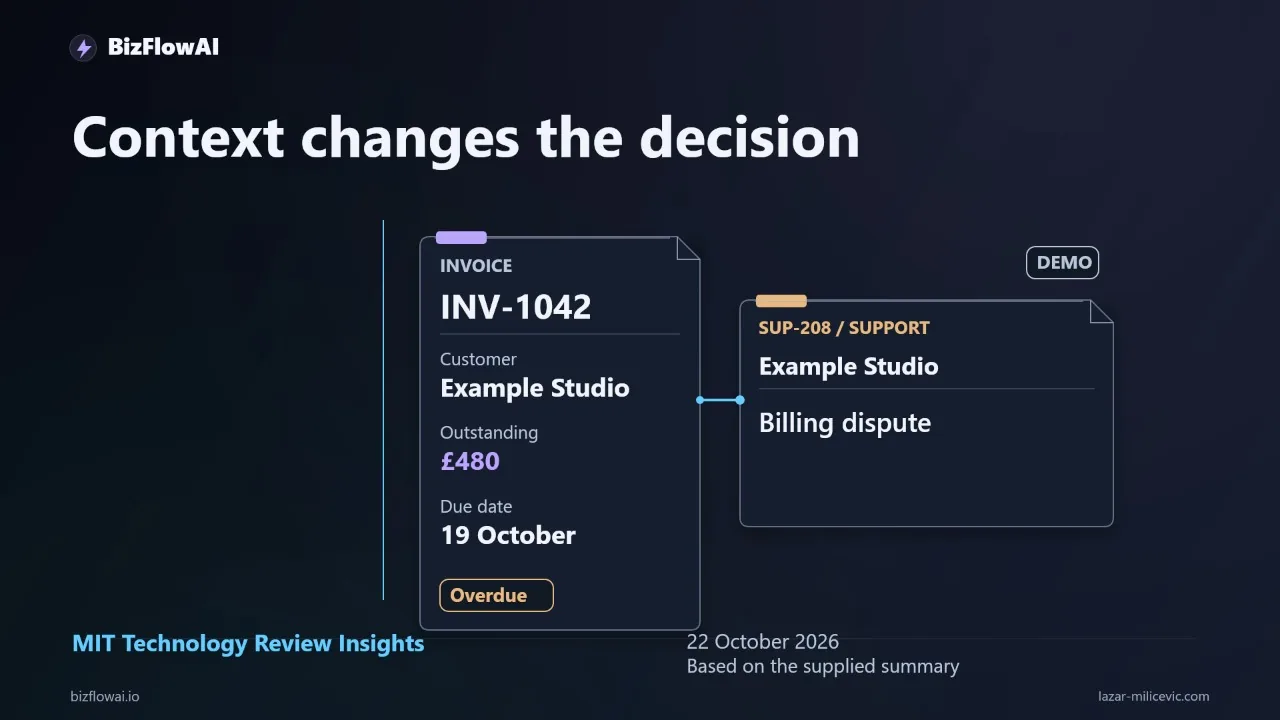
Your accounting system flags an invoice as 14 days overdue. Your automation drafts a polite reminder and sends it. Meanwhile, that same customer has an open billing dispute sitting in your support inbox, and someone on your team promised to pause collection until Friday. The email was well written and the decision was wrong.
This is the gap between "AI that performs a task" and "AI that makes a decision that fits your business." Below I'll walk through one concrete workflow, an overdue-invoice reminder. I'll show how to structure it so context changes the action, and how to test it on your own records before it sends anything.
What the MIT Technology Review piece actually says (and doesn't)
On October 22, 2026, MIT Technology Review Insights published "Making the case for context-aware AI", a Business Lab podcast interview with Devavrat Shah, chief scientist of enterprise AI at Celonis. Two caveats up front, because they matter for how much weight you give it:
- It's a sponsored piece, produced in partnership with Celonis, and Shah is a Celonis executive. The claims about the value of a context layer come from a vendor, not independent research.
- It's about enterprise AI. In the text I read, it never mentions invoices, CRMs, support inboxes, or small businesses. The invoice example in this post is mine, not theirs.
The argument itself is straightforward: without an understanding of how a business operates, even powerful models can miss the constraints and relationships that determine whether a decision is right. That's the part worth taking seriously, and you don't need an enterprise platform to act on it.
Shah's practical advice is also worth borrowing. Start with one specific business decision, identify its hardest steps, and test whether AI improves them. He also describes a contextual layer that lets agents work within defined guardrails and produce recommendations that people review and approve. No benchmark victory here, no new model release. Just a useful question: what information would change the action your automation takes?
Why the reminder is grammatically perfect and still wrong
The decision to send a payment reminder depends on facts that live in different places:
| Fact | Where it usually lives |
|---|---|
| Invoice amount, due date, paid status | Accounting system |
| Unresolved billing dispute | Support inbox (Gmail, Help Scout, etc.) |
| "Pause collection until Friday" | A Slack message, a CRM note, or someone's memory |
| Customer relationship and history | CRM |
A model given only the first row will write a flawless reminder. The cost is practical: another awkward email, another apology, another task landing on the founder. Multiply that across invoicing, lead follow-up and reporting, and the automation starts producing the admin it was supposed to remove.
This is also the real reason "we tried ChatGPT and it didn't integrate with anything" is such a common complaint. The answer lived in a chat window. The customer relationship lived across Gmail, accounting, a CRM and somebody's memory.
A note on the cost of fragmentation, since the claim "you lose hours a day moving information between tools" gets thrown around loosely. The numbers I can actually point to:
- A Harvard Business Review study of 20 teams (137 users) at three Fortune 500 companies found workers toggled between apps roughly 1,200 times a day, adding up to just under four hours a week spent reorienting, about 9% of work time. (HBR, 2022) That measures app-switching, not manual data transfer, and it studied large-company teams, so applying it to a five-person shop is an extrapolation.
- A Zapier survey of office workers reported that 76% spend 1-3 hours a day simply moving data from one place to another. (Zapier) It's a vendor survey and an older one, so treat it as directional.
Neither source proves a specific number for your business. Your own calendar will.
The architecture: code checks facts, the LLM reads messy text
Here's the structure I'd use. The key principle: ordinary code checks explicit rules; the LLM interprets unstructured text; neither is allowed to invent facts.
The trigger is an overdue invoice. The system then retrieves three things: the invoice, the customer's billing status, and any active collection hold.
from dataclasses import dataclass
from datetime import date
from enum import Enum

class Action(Enum):
    SEND_REMINDER = "send_reminder"
    REVIEW_TASK = "create_review_task"
    HOLD = "hold_for_review"
    SKIP = "skip"

@dataclass
class Context:
    invoice_id: str
    paid: bool | None            # None = couldn't determine
    dispute_open: bool | None
    hold_until: date | None
    hold_lookup_ok: bool

def decide(ctx: Context, today: date) -> tuple[Action, str]:
    # Missing data never becomes permission to send
    if ctx.paid is None or ctx.dispute_open is None or not ctx.hold_lookup_ok:
        return Action.HOLD, "required status unavailable"

    if ctx.paid:
        return Action.SKIP, "invoice already paid"

    if ctx.dispute_open:
        return Action.REVIEW_TASK, "open billing dispute"

    if ctx.hold_until and ctx.hold_until >= today:
        return Action.SKIP, f"collection hold until {ctx.hold_until}"

    return Action.SEND_REMINDER, "no blocking conditions found"
The important line is the first one. A None is not a False. If the accounting connection times out, the default outcome is a human looking at it, not an email going out.
Where the LLM fits
Rules like "is there a dispute?" are easy when you have a structured flag. They're harder when the only evidence is a customer's free-text message in your inbox. That's where a model earns its place: classifying a message, not deciding what to do about it.
CLASSIFY_PROMPT = """
Classify the customer's latest message about invoice {invoice_id}.
Return JSON only: {{"label": "dispute" | "payment_promised" | "payment_sent" | "unrelated" | "unclear",
"quote": "<exact sentence from the message that supports the label>"}}
Do not infer whether payment was actually received. Only report what the message claims.
"""
Two design choices matter here:
- The model returns a label plus a quoted sentence, so a human reviewing the decision can see exactly what it read.
- "payment_sent" is a claim, not a fact. The model can tell you the customer says they paid. Only your accounting record can tell you whether the money arrived. Your code reconciles the two; the model never overrides a recorded hold or a recorded payment.
If the label is unclear, route to review. Don't let the model guess its way into an action.
The action and the handoff
Every path out of the decision needs a defined destination:
- Checks pass: prepare a reminder (draft or send, depending on how much you trust the setup yet).
- Dispute found: create a review task with the relevant customer message attached, so whoever opens it doesn't have to hunt for context.
- Required status unavailable: hold the reminder and flag it. A missing record should never silently become permission to send.
This is the same pattern Shah describes in the interview: recommendations that people review and approve, within defined guardrails. For a small team, the "guardrail" doesn't need a platform. It can be a task in whatever tool you already use, with the evidence attached.
Build the decision record
The artifact that makes this trustworthy isn't the email. It's the decision record, written every time the workflow runs, whether it sends or not.
decision_record:
  invoice_id: INV-1042
  run_at: 2026-10-24T09:00:00Z
  sources_checked:
    - accounting: ok
    - support_inbox: ok
    - collection_holds: ok
  paid: false
  dispute_open: true
  dispute_evidence: "I was charged twice for the October retainer."
  hold_until: null
  proposed_action: create_review_task
  reason: open billing dispute
  approval_required: true
  approved_by: null
When a customer asks "why did you email me?" or "why didn't anyone follow up?", you can answer from the record instead of reconstructing it from three inboxes. It also solves the other problem I see constantly: the accounting record, the customer message, and the approval history disagreeing, with the founder stuck explaining why. A record written at decision time keeps those three stories in one place.
Store these in a plain table or even a spreadsheet to start. You don't need infrastructure to get the inspection benefit.
Test it on your own invoices before it sends anything
Here's the part you can do today. Take ten overdue invoices you've already handled. Make a test sheet with two columns: the correct next action and the specific fact that determined it. Make sure the set includes:
- a normal reminder case
- a paid invoice
- a disputed charge
- a missing customer record
Then run your proposed automation in dry-run mode, with sending disabled, and compare its decisions to your sheet. Count three things:
- Wrong reminders (it would have sent when it shouldn't)
- Missed holds
- Cases correctly passed to a human
These are test cases, not results I'm claiming to have measured. Your own records will give you the real numbers, which is the whole point.
Diagnose failures before touching the prompt
When a case comes out wrong, identify the cause first. Each one needs a different fix:
- The relevant fact was unavailable. The connection or export is the problem. Fix the integration.
- The source was stale. Your sync schedule or cache is the problem.
- The rule was missing. You never encoded "holds expire on a date." Add the rule.
- The model misread the message. Only now is it a prompt or classification issue.
A longer prompt will not repair a broken accounting connection. Most of the failures I see in this kind of workflow are the first three, not the fourth.
Where this shows up in practice
This pattern, one decision with a few connected records, a rules layer, a model for unstructured text, and a review path, is the type of automation I work on. My recommendation is to start by picking a single decision like the overdue reminder, wire only the records that decision depends on, and keep a decision log so every automated action can be explained afterward. The goal isn't an AI that knows everything about your company. It's one handoff that reliably withholds the wrong email.
My take
Context-aware AI becomes useful when context changes an action you can verify. Uploading more company documents into a model is easy to demo. Reliably holding back one inappropriate reminder takes integration, clear rules, and an exception path.
So start narrow. Pick one decision. Connect the two or three records that determine it. Run it dry against ten cases you already know the answer to. Count the errors and the manual interventions, fix the real cause of each, then expand. That's how an AI feature stops being a demo and becomes part of how the business runs.
Want more like this?
I write about practical AI automation for solopreneurs and small teams.
Planning an AI automation project or need a second opinion on your architecture?
Connect with me on LinkedIn — Lazar Milićević, senior engineer building AI automations.
Visit bizflowai.io for more on practical AI automation.
Frequently asked questions
What is context-aware enterprise AI?
Context-aware enterprise AI is automation that understands how a business actually operates, including constraints and relationships that aren't in the task it was given. For example, an AI drafting a payment reminder should know about an unresolved billing dispute or an agreed collection pause. The value comes when that context changes an action you can verify, not from uploading more company documents.
Why does business context matter for AI automation?
Without business context, AI can produce a perfectly written output that is still the wrong decision. An overdue-invoice reminder may be grammatically flawless yet inappropriate if the customer has an open dispute or someone agreed to pause collection until Friday. Wrong actions create extra admin, awkward emails, and apologies, which defeats the purpose of automating the work.
How should I structure an AI workflow for overdue invoice reminders?
Trigger on an overdue invoice, then retrieve the invoice, the customer's billing status, and any active collection hold. Use ordinary code to check explicit rules: is it paid, is there a dispute, has the hold expired? An LLM can interpret unstructured customer messages but shouldn't invent payment status or override a recorded hold. Pass disputes and missing data to a human for review.
How do I test an AI automation before letting it send anything?
Take ten overdue invoices you've already handled and write the correct next action and the deciding fact for each. Include a normal reminder, a paid invoice, a disputed charge, and a missing customer record. Run the automation with sending disabled, then compare its decisions to your sheet. Count wrong reminders, missed holds, and cases correctly passed to a human.
What should I do when an AI automation gets a case wrong?
Identify the cause before changing the prompt, because each failure needs a different fix. Was the relevant fact unavailable? Was the source stale? Was a rule missing? Or did the model misread the message? A longer prompt won't repair a broken accounting connection. Also, a missing record should hold the action for review rather than silently becoming permission to send.