Canva Craft: Can One Brief Cut Your Rework?
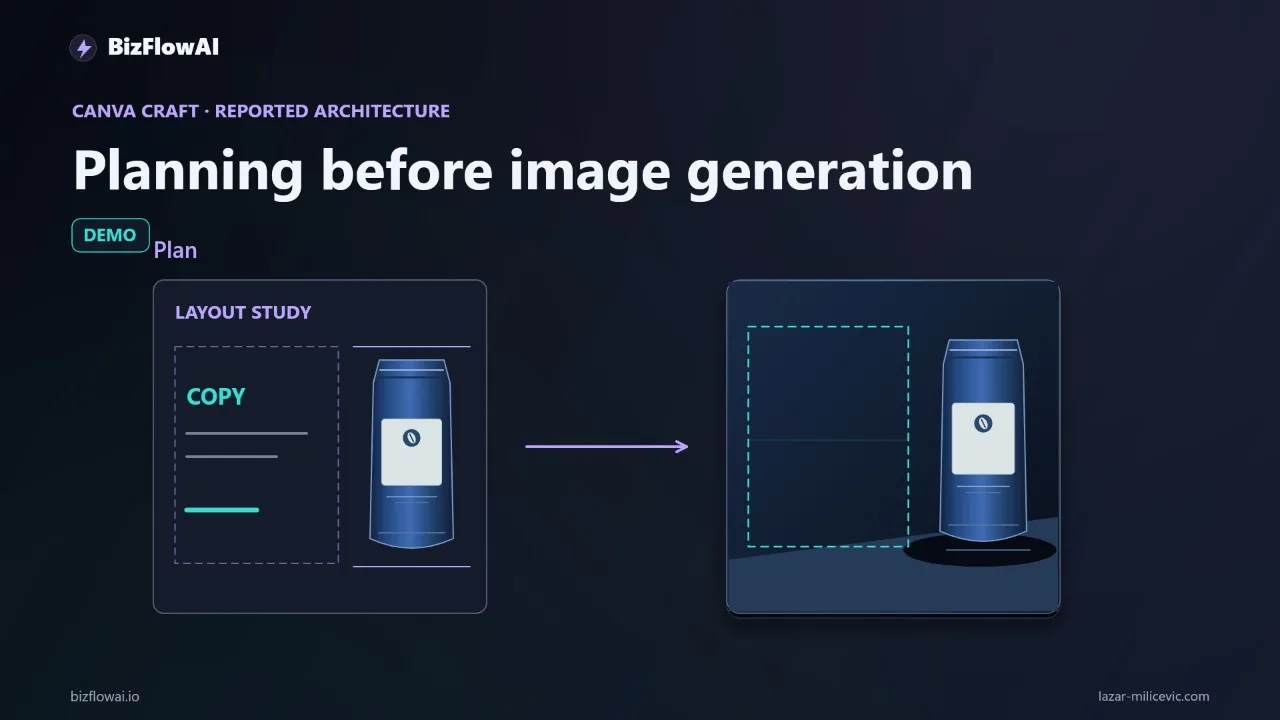
You can generate an image in seconds. Getting one you can publish, with the right message, a layout that leaves room for the price, and a client who has signed off, is where the afternoon goes. Canva just released an image model built around layout planning, and the question for a small team is narrow: does it reduce the editing between brief and approval?
What Canva actually announced (and what it didn't)
Canva announced Canva Craft on October 22, 2026, calling it its first state-of-the-art image generation model, developed and trained by Canva Research, its in-house AI lab. The headline feature is a two-stage architecture: a planning model writes a composition plan, and a rendering model turns that plan into the image.
According to Canva's launch post, the plan covers which elements appear, their spatial relationships, relative scale, visual hierarchy, and any text. The facts that matter for a small business:
- Output goes up to 2K resolution across more than 30 aspect ratios, and you can enter your own.
- Prompts can be written in any language, and Craft can create text in 55 languages.
- Canva says it was trained on millions of human-made templates from its content library (posters, social posts, presentations, menus, typography-rich layouts), not mainly on photographs.
- It's available to all Canva users from Dream Lab, through the Public API, and via the Canva MCP Server, which Canva labels "Coming Soon."
What the announcement doesn't give you: a measured reduction in revision time, a business-workflow benchmark, or any basis for promising that your next campaign comes out ready to publish. It also doesn't establish whether you can inspect or edit the planning stage. Planning inside a model and handing you an editable plan are different capabilities. In the sources I reviewed, there's no statement that the plan can be reviewed or changed, so don't assume it can.
So treat "greater precision, consistency, and control" as Canva's claim, not a result.
Reading the benchmark claims without over-reading them
Canva says Craft debuted as the fourth most advanced image generation model on DesignArena, and that its outputs rank #1 for People & Portraits (out of 87 models) and Landscapes & Nature (out of 85 models), #2 for Abstract & Patterns, and #4 for Products. Independent coverage from Tech Times reports an overall Elo of 1,341. Several outlets report that the three models ranked above Craft all come from OpenAI. Treat the subcategory rankings as Canva's own claims and check the public leaderboard yourself.
Canva also ran an internal evaluation: professional designers and dozens of researchers assessed more than 25,000 pairs of images against leading models. That's Canva's own test, not an independent one.
Here's the builder's problem with all of it. A leaderboard measures which image people prefer in a head-to-head. It doesn't measure how much editing a team needs before approving an asset. As one early write-up puts it, customers should test whether Craft saves editing time. A model can win preference votes and still hand you a background with nowhere to put the price.
Product images are a good example. A product-category ranking is a taste ranking. Your question is whether the product sits where your brief said it should, with clear space where the headline goes.
Why layout planning is the part worth testing
A planning stage is relevant to small-business work for a specific reason: layout decisions decide whether an image is usable. A beautiful background can leave no room for a price. A strong focal point can compete with the headline. If planning improves those decisions, it could cut downstream editing. That's the hypothesis, not the outcome.
Consider the workflow most small agencies and solo operators actually run for a weekly promotion:
- The owner emails the offer.
- Someone copies it into a design brief.
- Someone generates a visual, moves the headline, checks the price, and pastes a preview into chat.
- The client asks for a change.
- Now the email, the design file, and the approval thread disagree about which version is final.
The generation step is the cheap part. The handoffs eat the afternoon. If you're already losing two to four hours a day to email, invoicing, lead follow-up, and reporting, an extra revision loop on every promo is expensive, and hiring someone to run it isn't an option at five people.
I'd accept a less impressive first image if it consistently took less work to finish. That's the trade this test is designed to measure.
The brief: write it before you generate anything
The most useful thing you can do with any image model is separate what the model draws from what a human must get exactly right. For promotional work, that means the model produces the background and composition, and your offer and price stay as editable text added afterward. A wrong price in a pixel-rendered image is a publishing error, and nobody can fix it with a text edit.
Here's the brief I'd use for a recurring weekly promo:
Create a background for a square promotional post.
Product on the right.
Quiet space on the left for a headline and price.
Use the supplied brand colors.
Do not generate text.
Keep the offer and price in structured form, outside the image prompt:
# weekly_offer.yaml - the single source of truth for one promo
offer_id: 2026-w43-promo
headline: "<exact headline from the client's email>"
price: "<exact price, copied, not retyped>"
valid_until: "<date from the client's email>"
brand:
  colors: ["<hex 1>", "<hex 2>"]
  logo: brand/logo.png
layout:
  aspect: "1:1"
  product_side: right
  text_zone: left
status: draft   # draft -> client_approved -> published
Two reasons to structure it this way. First, when the client asks for a change, you edit one file, and the email, the design, and the approval thread stop disagreeing. Second, it makes the test reproducible: the same template, five different offers.
Canva says small text is a known weak spot. Its newsroom names fine print and technical drawings as areas it intends to improve, and coverage notes that Canva's claims about readable text and precise edits haven't been independently verified, advising users to proofread generated wording before publishing. So "Do not generate text" in the brief isn't timidity. It keeps the one error that costs money out of the model's hands.
The five-offer test and the pass/fail rule
Run the identical brief template against five different weekly offers, then compare against your current process. Log every attempt, including the rejected ones. If you only record the best result, you're measuring the model's ceiling instead of your workflow.
A simple log is enough:
import csv
from dataclasses import dataclass, asdict

@dataclass
class Trial:
    offer_id: str
    process: str               # "current" or "craft"
    regen_attempts: int        # how many times you re-ran the generation
    edit_minutes: float        # time from first output to approval-ready
    passed_approval: bool      # did it meet your normal approval check?
    rejected_outputs: int      # outputs you threw away entirely

def save(trials: list[Trial], path: str = "craft_test.csv") -> None:
    with open(path, "w", newline="") as f:
        w = csv.DictWriter(f, fieldnames=asdict(trials[0]).keys())
        w.writeheader()
        w.writerows(asdict(t) for t in trials)

def summarize(trials: list[Trial], process: str) -> dict:
    rows = [t for t in trials if t.process == process]
    n = len(rows)
    return {
        "process": process,
        "n": n,
        "avg_edit_min": sum(t.edit_minutes for t in rows) / n,
        "avg_regens": sum(t.regen_attempts for t in rows) / n,
        "pass_rate": sum(t.passed_approval for t in rows) / n,
    }
Record three things per trial: minutes spent editing, number of regeneration attempts, and whether the finished asset passes your normal approval check. Keep the approval check identical across both processes. If Craft output gets a looser review than your current assets, the comparison is rigged.
The decision rule is one line: does Craft reduce total editing time while meeting the same approval standard? If yes, you have evidence for adopting it. If no, the architecture hasn't earned a place in this workflow yet.
Five trials isn't a statistical study. It's enough to catch a large effect in either direction, and a large effect is the only kind worth rebuilding a workflow around. If the result is close, that's an answer too: the gain isn't big enough to change anything.
Things to account for in your numbers:
- Speed is a variable, not a given. Generation time through the API is not something to take on faith, so time your own generations and include waiting time in "minutes spent." Check Canva's developer documentation for current figures.
- Cost is unknown. Check your own Canva plan's AI-credit allowance before you run all five offers, and record credits consumed per attempt.
- Commercial rights are unsettled in third-party coverage. Check Canva's own terms for your plan before publishing anything generated.
Making the edit step cheaper: Magic Layers
Canva says Craft outputs are meant to work with Magic Layers, which turns generated images into editable design elements, and that the architecture allows targeted changes without unnecessarily altering everything else. If that holds up, it's the other half of the rework story: the plan matters less if a bad layout is a two-minute fix instead of a regeneration.
The details, per Business Wire: Magic Layers converts flat images into editable layers, with text restored as live text boxes. It launched in public beta in March 2026 and supports single-page PNG and JPG files. A third-party guide adds that there are image-size limits and that usage counts toward a premium AI allowance, and advises you to proofread every text layer, because editable text doesn't guarantee accurate text. Check Canva's current documentation for the exact limits on your plan.
Add that to the test as a fourth column: when an output is close but not right, how long does the targeted fix take, and does it leave the rest of the design intact? That's a more honest measure of "control" than any ranking.
Before you wire it into automation
If your goal is a pipeline (approved offer in, draft asset out, human approval before publishing), check the integration surface separately from the image quality. Don't assume Craft offers the API access or automation controls your stack needs.
What the sources say today:
- Canva lists the Public API and the Canva MCP Server as access routes, but labels the MCP connection "Coming Soon," and the newsroom's availability section lists it as an access route today. Those two statements conflict, so don't design around MCP until Canva clarifies.
- Tech Times reports the developer API as in preview, and says the API exposes fewer aspect ratios than the Canva editor. If your template needs a non-standard ratio, test that the API path supports it.
- Canva says faster Craft variants are upcoming, aimed at high-quality generation at a lower cost than leading frontier models. No release date or price has been given, so don't budget around them.
The handoff I'd build stays deliberately boring: structured offer in, draft background generated, text added from the structured file, human approval before anything is published. The model touches one step. Everything that affects a purchase stays in your hands.
Where this fits in practice
I'm a senior engineer who builds AI automations for solopreneurs and small teams, and the pattern above is the kind of glue work I care about: keeping a single source of truth so the email, the design, and the approval thread never disagree. If your test shows Craft saves editing time, that surrounding workflow is what turns one good tool into something that runs every week without you babysitting it. You can see what I work on at bizflowai.io.
The verdict you're testing for
"Plans before generating" is an interesting engineering choice, and Canva's results claims are its own so far. Nobody has published an independent hands-on comparison or a rework benchmark yet, so the answer for your business has to come from your own five offers and your own approval standard. Run the brief, log the rejects, and let the pass/fail rule decide.
Want more like this?
I write about practical AI automation for solopreneurs and small teams.
Connect with me on LinkedIn — Lazar Milićević, senior engineer building AI automations.
Visit bizflowai.io for services, case studies, and AI consulting.
Frequently asked questions
What is Canva Craft?
Canva Craft is Canva's first in-house AI image model, as reported by The Verge. Its distinguishing feature is a two-stage architecture that plans a design before generating the image. Canva says this approach gives greater precision, consistency, and control. Those benefits are the company's claims; the announcement summary offers no measured results, such as reduced revision time or business-workflow benchmarks.
How does Canva Craft's two-stage architecture work?
According to The Verge's report, Canva Craft plans a design first and then generates the image. Canva says this planning step improves precision, consistency, and control. What remains unclear is whether users can inspect or edit the planning stage. Planning inside a model and offering an editable plan are different capabilities, so that detail should be verified before relying on it.
Why does layout planning matter for AI-generated marketing images?
Layout decisions determine whether a generated image is actually usable. A beautiful background can leave no space for a price, and a strong focal point can compete with the headline. If a model plans composition before generating, it could reduce downstream editing. That is an opportunity to test, not a guaranteed outcome, since no benchmarks currently show reduced revision time.
How do I test whether Canva Craft saves time on recurring promotional graphics?
Pick one recurring asset, like a weekly promo graphic. Write a fixed brief: square background, product on the right, quiet space on the left for headline and price, brand colors, no generated text. Add the offer and price afterward as editable text. Run the brief for five different offers and record editing minutes, regeneration attempts, and whether each result passes approval, including rejected outputs.
When should I adopt Canva Craft in my design workflow?
Adopt it only if testing shows it reduces total editing time while meeting your existing approval standard. If it does, you have evidence for adoption. If not, the architecture hasn't earned a place in your workflow yet. Also verify separately whether Canva Craft offers the API access or automation controls your stack needs, rather than assuming it does.