Build a LangChain RAG Assistant That Shows Its Sources
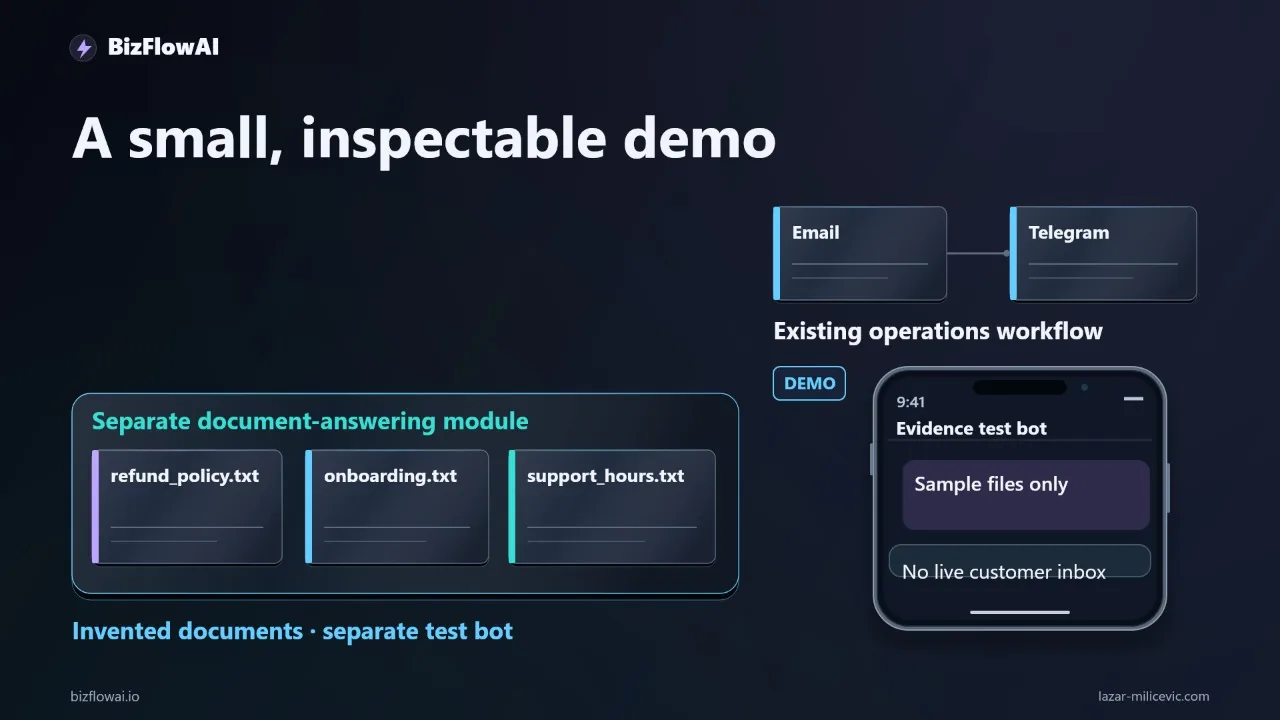
"Can we refund a completed setup?" Someone on your team answers that question from memory, or digs through an email thread, an old shared-folder PDF, and a founder's DMs. This tutorial builds a small LangChain pipeline that answers from approved documents, points to the exact passage it used, and says "I don't know" when the files don't cover the question.
Everything here uses invented business documents. We are not connecting a live customer inbox or shipping a production assistant. We build the document-answering piece on its own so you can inspect it before it touches anything important. Here's exactly how I built this, step by step.
The target: a short answer plus a reference you can open
The destination is a question in Telegram, a short answer, and a source reference you can open and check. Our sample refund policy reads: "Completed setup work is non-refundable. Duplicate charges must be reviewed separately." A useful answer needs both sentences. If retrieval returns only the first one, the assistant misses an exception that matters to the customer.
That is the whole design goal: the answer and the evidence travel together. A fluent answer without a checkable source is just a confident guess.
The everyday problem looks like this. A client asks about a refund. Someone searches an email thread, opens a shared folder, finds a policy that may be out of date, then messages the founder to confirm. Repeat that across invoicing, lead follow-up, and reporting, and the lookups add up. That is the problem we're targeting, not a measured saving from this demo.
RAG (retrieval-augmented generation) means: find relevant document passages first, then ask a model to answer using only those passages. LangChain's retrieval docs describe this as a "2-Step RAG" pattern: the app retrieves content, then supplies it to the LLM as context (LangChain retrieval docs). The same page covers an agentic variant, and LangChain's agentic RAG tutorial describes an agent that decides whether to search or answer directly (agentic RAG tutorial). For a policy assistant I prefer the fixed two-step version: it always retrieves, so there's no path where the model answers a refund question without looking at the policy.
The six steps: prepare approved documents, load and split them, index them, retrieve evidence, generate a bounded answer, connect to Telegram.
LangChain connects the parts. It does not make your documents correct, enforce permissions for you, or guarantee the answer follows the evidence. Those boundaries are ours to build.
Step 1: Approved documents and a manifest
Start with a folder called approved_docs and three plain-text files: refund_policy.txt, onboarding.txt, support_hours.txt. Plain text keeps the lesson on retrieval instead of PDF extraction.
# refund_policy.txt
Completed setup work is non-refundable. Duplicate charges must be reviewed separately.

# onboarding.txt
Onboarding begins after the signed agreement and initial payment have both been received.

# support_hours.txt
Standard support operates Monday through Friday, from nine to five, Europe Belgrade time.
These hours exclude public holidays.
These are sample rules, not advice about what your business policy should be.
Next, a small manifest that gives every document a stable ID, a version, an effective date, and an approval status. The point is to tell the policy you meant to use apart from a draft someone left in a folder.
# manifest.yaml
documents:
  - file: refund_policy.txt
    doc_id: POL-REFUND
    version: "1.2"
    effective_date: "2026-01-01"
    status: approved
  - file: onboarding.txt
    doc_id: PROC-ONBOARD
    version: "1.0"
    effective_date: "2026-01-01"
    status: approved
  - file: support_hours.txt
    doc_id: POL-SUPPORT
    version: "1.1"
    effective_date: "2026-01-01"
    status: approved
For this demo, access is simple: one authorized test user can read all three files. A real deployment needs permission filtering before any passage reaches the model, because once text is in the prompt, you can't un-leak it.
Step 2: Load, validate, and split
Create three files: ingest.py (document prep), answer.py (questions), bot.py (Telegram adapter). That separation lets you test answers in a terminal before adding chat.
Set up a virtual environment. LangChain 1.0 requires Python 3.10 or newer; Python 3.9 support was dropped (LangChain v1 announcement). The packages for this example are langchain-community, langchain-text-splitters, langchain-openai, langchain-chroma, and python-telegram-bot. Package interfaces move, and legacy pieces have been relocated, so pin the exact versions that work for you in requirements.txt rather than relying on an unpinned install. I use an OpenAI-compatible model integration for embeddings and answers; other supported providers work too.
# ingest.py (loading + validation)
import yaml
from pathlib import Path
from langchain_community.document_loaders import TextLoader

DOCS_DIR = Path("approved_docs")
manifest = yaml.safe_load(Path("manifest.yaml").read_text())["documents"]

docs = []
for entry in manifest:
    if entry["status"] != "approved":
        continue  # drafts never get indexed
    loader = TextLoader(str(DOCS_DIR / entry["file"]), encoding="utf-8")
    for d in loader.load():
        if not d.page_content.strip():
            raise ValueError(f"Empty document: {entry['file']}")
        d.metadata.update({
            "doc_id": entry["doc_id"],
            "version": entry["version"],
            "effective_date": entry["effective_date"],
            "status": entry["status"],
            "filename": entry["file"],
        })
        docs.append(d)

print(len(docs), [d.metadata["filename"] for d in docs])
print(docs[0].page_content)  # eyeball one document
Before splitting anything, print the document count and filenames, and open one loaded document. If extraction loses a sentence here, no prompt later can recover it reliably. This is also the place to reject empty files or files without approval metadata.
Now split. LangChain's splitter docs recommend starting with RecursiveCharacterTextSplitter for most use cases (text splitter docs). It measures chunk size in characters by default, not tokens (recursive splitter guide).
from langchain_text_splitters import RecursiveCharacterTextSplitter

splitter = RecursiveCharacterTextSplitter(chunk_size=800, chunk_overlap=120)
chunks = splitter.split_documents(docs)

for i, c in enumerate(chunks):
    c.metadata["chunk_id"] = f"{c.metadata['doc_id']}-{i}"
    if c.metadata["doc_id"] == "POL-REFUND":
        print(c.metadata["chunk_id"], "→", c.page_content)
800 characters with 120 overlap are starting settings for this tiny example, not universal best values. There is no single universal overlap value, so don't trust anyone's magic number, including mine. Test your own documents.
The check that matters: print every chunk from the refund document and find the non-refundable rule and its duplicate-charge exception. Are they together? If the split separated them, change the document structure or the splitter settings before continuing. Overlap can preserve nearby context, but it can't promise that a rule and its exception land in the same chunk. For policy documents, I often fix this on the authoring side by keeping each rule and its exceptions in one paragraph.
Step 3: Index and retrieve evidence
Embed the chunks and store them in Chroma, keeping the metadata attached.
from langchain_openai import OpenAIEmbeddings
from langchain_chroma import Chroma

embeddings = OpenAIEmbeddings(model="text-embedding-3-small")
store = Chroma.from_documents(
    chunks,
    embeddings,
    persist_directory="./index",
)
Cost is not a concern at this scale. Embedding pricing is quoted per million input tokens, and three short text files are a rounding error at any plausible rate. Check current rates on your provider's pricing page; a third-party guide such as the nops.io OpenAI pricing overview is a starting point, not the final word. Cost starts to matter when you embed thousands of documents, and even then you only re-embed what changed.
Now retrieval. Test it in isolation, before any LLM is involved:
retriever = store.as_retriever(search_kwargs={"k": 3})

def show(q):
    results = store.similarity_search_with_score(q, k=3)
    for doc, score in results:
        m = doc.metadata
        print(f"{score:.3f}  {m['doc_id']} v{m['version']} [{m['chunk_id']}]")
        print("   ", doc.page_content[:120].replace("\n", " "))

show("Can we refund a completed setup?")
This is the most important debugging habit in RAG: read what was retrieved before you read what was generated. If the refund question doesn't surface the refund chunk with both sentences, no amount of prompt tuning fixes it. LangSmith's retriever-trace format shows the same idea in a hosted tool: each retrieved document carries metadata such as source, chunk ID or score, displayed next to the document so you can see which chunks an answer was built from (LangSmith retriever traces). Our metadata fields give you the same visibility in a terminal.
Add a relevance threshold so weak matches count as "nothing found." The score semantics depend on your vector store and distance metric, so calibrate on your own test questions instead of copying a number from this post.
Step 4: A bounded answer that cites its chunks
Generation is where beginners relax too early. The prompt should restrict the model to the supplied passages, require chunk IDs, and give it an explicit way to refuse.
# answer.py
from langchain_openai import ChatOpenAI

llm = ChatOpenAI(model="YOUR_MODEL_NAME", temperature=0)  # pick a model your provider supports

SYSTEM = """You answer questions about company policy using ONLY the passages below.
Rules:
- Cite the chunk_id of every passage you rely on, in square brackets.
- If the passages do not contain the answer, reply exactly: NOT_FOUND
- If the question is ambiguous, ask ONE clarifying question instead of guessing.
- Do not use outside knowledge. Do not infer policy that is not written."""

def answer(question: str, score_cutoff: float):
    hits = store.similarity_search_with_score(question, k=3)
    hits = [(d, s) for d, s in hits if s <= score_cutoff]  # lower = closer for distance metrics; verify for yours
    if not hits:
        return {"answer": "I couldn't find this in the approved documents.", "sources": []}

    context = "\n\n".join(
        f"[{d.metadata['chunk_id']}] (v{d.metadata['version']}, "
        f"effective {d.metadata['effective_date']})\n{d.page_content}"
        for d, _ in hits
    )
    msg = llm.invoke([
        ("system", SYSTEM),
        ("human", f"Passages:\n{context}\n\nQuestion: {question}"),
    ])
    text = msg.content
    if "NOT_FOUND" in text:
        return {"answer": "I couldn't find this in the approved documents.", "sources": []}
    return {"answer": text, "sources": [d.metadata for d, _ in hits]}
A note on model names: documentation examples use varying names, and they change often, so I deliberately left the model as a placeholder. Use whatever your provider currently lists as supported.
Here is a subtle trap. Returning "the documents we retrieved" as sources is not the same as "the documents the answer actually used." Older RetrievalQA-style chains returned every retrieved document under a source-documents flag, whether or not the model relied on it. In this design the model cites chunk IDs inside its answer, and your code should check that those IDs are a subset of what was retrieved:
import re

def validate_citations(text, hits):
    cited = set(re.findall(r"\[([A-Z\-]+-\d+)\]", text))
    retrieved = {d.metadata["chunk_id"] for d, _ in hits}
    return cited and cited <= retrieved
If the model cites something that wasn't retrieved, or cites nothing, treat the answer as failed and route it to a person. That check is cheap and catches a whole class of fabricated-looking references.
Step 5: Test what demos skip
Most RAG demos stop at one fluent answer. Write a small test file with three kinds of questions, and run it every time you change the splitter, prompt, or documents.
tests = [
    # 1. In-scope: must cite refund chunk AND mention duplicate-charge review
    ("Can we refund a completed setup?", "answerable"),
    # 2. Missing information: documents say nothing about this
    ("Do you offer a student discount?", "must_refuse"),
    # 3. Ambiguous: which kind of 'hours'?
    ("What are the hours?", "should_clarify"),
    # 4. Mixed: partly covered
    ("Is support open on public holidays, and can I get a refund on that day?", "partial"),
]
What I check on each:
- Answerable: the response includes both the non-refundable rule and the duplicate-charge exception, and cites the refund chunk. If only the first sentence appears, go back to Step 2 and fix the split.
- Missing information: the assistant must say it couldn't find it. If it invents a student-discount policy, tighten the prompt and the score cutoff.
- Ambiguous: a clarifying question beats a guess. "What are the hours?" could mean support hours or onboarding timing.
- Partial: answer the covered half, state that the other half isn't in the documents. This is the hardest case, and where I've seen the most drift.
I haven't benchmarked a hallucination-reduction percentage for this setup, and I'd distrust any tutorial that quotes one without a published methodology. What you can do is keep these test cases, run them after every change, and track pass/fail on your own documents.
Step 6: Telegram adapter, and where humans stay in the loop
Only now connect chat. Telegram's Bot API gives you two mutually exclusive ways to receive updates: getUpdates (long polling) or webhooks, and getUpdates doesn't work while a webhook is set (Telegram Bot API). For a local test, polling is simpler. If you write your own polling loop, the Bots FAQ explains how to use the offset parameter so you don't receive the same updates repeatedly (Telegram Bots FAQ). The python-telegram-bot library offers a ready-made run_polling, so you don't have to write that loop yourself.
# bot.py
from telegram import Update
from telegram.ext import ApplicationBuilder, MessageHandler, ContextTypes, filters
from answer import answer

ALLOWED_USER_IDS = {123456789}  # your test user only
SCORE_CUTOFF = 1.0              # calibrate on your own test questions

async def handle(update: Update, ctx: ContextTypes.DEFAULT_TYPE):
    if update.effective_user.id not in ALLOWED_USER_IDS:
        return
    result = answer(update.message.text, SCORE_CUTOFF)
    refs = "\n".join(
        f"• {m['doc_id']} v{m['version']} ({m['filename']})" for m in result["sources"]
    )
    reply = result["answer"] + (f"\n\nSources:\n{refs}" if refs else "")
    await update.message.reply_text(reply)

app = ApplicationBuilder().token("YOUR_BOT_TOKEN").build()
app.add_handler(MessageHandler(filters.TEXT & ~filters.COMMAND, handle))
app.run_polling()
Telegram limits how long a single message can be, so check the current limit on the official Bot API page (Telegram Bot API) before you rely on long answers. Short answers plus source references are the safer design anyway.
Now the part that matters most for a business: what to automate and what to review.
| Question type | Handling |
|---|---|
| Hours, onboarding steps, simple factual policy | Automate, with source reference |
| Refunds, credits, disputes, anything with money or legal weight | Draft only; a person approves before it reaches a customer |
| Not found / ambiguous / failed citation check | Escalate to a person |
| Anything involving personal or confidential data | Not in the first version |
LangChain 1.0 ships a prebuilt HumanInTheLoopMiddleware that requires approval for sensitive tool calls (What's new in LangChain v1). That's the built-in route if you move to an agent-based design built with create_agent, which the v1 docs name as the replacement for langgraph.prebuilt.create_react_agent (v1 migration guide). For this demo, a simple rule in code (money keywords go to a review queue, never straight to the customer) gets you most of the safety with none of the framework weight.
Two last guardrails. First, version your documents and re-run the test file when a policy changes; a stale index is how an outdated refund rule reaches a customer. Second, log every question, retrieved chunk IDs, and final answer, so when someone disputes an answer you can show exactly which paragraph produced it.
Where this fits in a real workflow
This document assistant is a standalone piece, and I built it that way on purpose. It's the same reason I'd tell you to build it separately: inspect it, break it with the test questions above, and only then wire it into a live inbox.
Working code, working system. If you can't trace an answer back to a paragraph you can open, don't let it near a customer.
Where bizflowai.io fits
bizflowai.io is where I share practical automation for solopreneurs and small teams, and the pattern in this post is the one I care about: approved sources, retrieval you can inspect, answers that carry their references, and a human step for anything involving money or exceptions. If your team keeps searching folders and threads to answer the same questions about refunds, onboarding, or support hours, this is a good first workflow to build and test on its own before connecting it to live channels. More at bizflowai.io.
Want more like this?
I publish practical AI automation and GenAI engineering tutorials for small teams.
Planning an AI automation project or need a second opinion on your architecture?
Connect with me on LinkedIn — Lazar Milićević, senior engineer building practical AI automation.
Visit bizflowai.io for more tutorials and automation resources.
Frequently asked questions
What is RAG (retrieval-augmented generation)?
RAG stands for retrieval-augmented generation. In plain English, the system first finds relevant passages in your documents, then asks a model to write an answer using only those passages. LangChain helps connect the parts, but it does not make your documents correct, enforce permissions automatically, or guarantee that the answer follows the evidence. You have to build those boundaries yourself.
How do I build a document-answering Telegram assistant with LangChain?
Follow six steps: prepare approved documents, load and split them, index them, retrieve evidence, generate a bounded answer, and connect the result to Telegram. Start small, with plain-text files in an approved_docs folder. Keep ingestion (ingest.py), answering (answer.py), and the Telegram adapter (bot.py) in separate files so you can test answers in a terminal before adding chat.
Why does retrieving the full policy passage matter for refund answers?
A useful answer may depend on more than one sentence. In the tutorial's sample policy, one sentence says completed setup work is non-refundable, and the next says duplicate charges must be reviewed separately. If retrieval returns only the first sentence, the response could miss an exception that matters to the customer. A good response needs both sentences.
How do I keep a RAG assistant from answering with outdated or draft policies?
Give each document a stable identifier, a version, an effective date, and an approved status in a small manifest. This distinguishes the policy you meant to use from a draft someone left in a folder. A confident answer based on an outdated rule can cause a customer dispute or an audit problem, so approved sources matter. Real deployments also need permission filtering before any passage reaches the model.
Why use a RAG assistant instead of pasting a policy into an AI chat?
Pasting a policy into an AI chat does not connect Gmail, your documents, and your team's chat, so you still carry information between tools yourself. The tutorial targets the everyday problem of searching email threads and shared folders, then asking the founder whether a policy still applies. It cites two to four hours a day of administrative work as the problem targeted, not a measured saving.